

Tech Tip: Putting AI to Work. Leveraging Agentic Tools to Reclaim Leadership Time

How agentic AI allows leaders to focus on human precision rather than busy work.
We’ve all seen the future in movies or dreamed of having a computer that actually does the work for us. That time is finally arriving. AI has been dominating the headlines, social media, and almost every corner of the workplace. Just as leaders are getting up to speed on what ChatGPT can do, the conversation has shifted to Google’s Gemini Gems or Anthropic’s newest addition, Claude Cowork. "AI Agents" is the buzzword of the moment, but for the everyday leader, it represents a real shift. We are moving well beyond AI as a simple chatbot and into a world where these tools can actually get real work done for you.
It is easy to feel overwhelmed by the noise. Every week there is a new "game-changing" tool or a "must-have" app. Most of us have experimented with basic chat tools to help draft a tough email or summarize a long meeting note. That is a great first step, but the landscape is shifting from tools that just "talk" to tools that actually "do". We are moving into the era of agentic AI. These are resources that act less like a search bar and more like a highly capable co-worker.
You don't need to become a tech expert. You just need to know which of these tools can help you manage the grey so that you can stay focused on your people and the most critical elements of your business. Having assistance in administrative tasks, additional research, or calendar management can be very helpful in freeing up more time for important work only you can do. Let’s look at a few of the most impactful resources getting attention right now and, more importantly, how you can actually use them in your day-to-day leadership journey.
The Personalized Expert: Gemini Gems
The biggest frustration with basic AI is that you often have to repeat yourself. You spend ten minutes explaining your role, your team’s culture, and your specific voice before you even get to your question. Gemini Gems changes that by allowing you to create custom AI experts for specific tasks. (This is similar to ‘Projects’ in ChatGPT.)
Think of a Gem as a "pre-loaded" version of AI. You define its persona, its goals, and its rules once, and it stays that way every time you open it. For example, you could build a "Coaching Partner" Gem. You tell it to always prioritize the "ask, don't tell" philosophy. You give it context on your company's core values or what is most important to you. Now, whenever you need to prep for a development check-in, you don't have to explain the background. You just say, "I have a supervisor struggling with time management," and the Gem immediately gives you a list of high-value questions tailored to that specific situation.
It removes the repetitive work of prompting and lets you jump straight into the thinking. You can even share these Gems with your other leaders to ensure you are all approaching development with the same level of consistency. In many ways, it lets you define the roles you want on your support team.
The Digital Project Manager: Claude Cowork
If Gems is your specialized coach, Claude Cowork is your digital project manager. While regular chatbots live in a single window, Cowork is designed to take action across your files and folders. It is an "agentic" tool, which means it can execute a plan with a level of autonomy that simple chat doesn't have.
For any leader, this is a massive time-saver for the administrative heavy parts of the job. You can give it access to a folder of raw notes, PDF reports, and exported data. You might tell it, "I need a summary of the common themes from these associate feedback surveys and a draft for a three-tab spreadsheet to track our progress". Cowork doesn't just tell you how to do it; it performs the tasks. It can clean up messy folders, batch-rename files, and synthesize research across multiple documents without losing context. It is about describing an outcome and coming back to finished work. Claude Cowork will likely be limited to use on your personal computer. I suspect any company issued computers will be locked down from using this for now. But, even with that limitation, this can be useful for managing some personal work and get insights for other activities as well.
The Deep Researcher: Perplexity Computer
We’ve all been asked by our boss for a "deep dive" into a situation, issue, or topic, and you know you’re about to lose three hours on Google searching for answers you do not already have. Perplexity Computer is designed to solve that. It isn't just a search engine. It is a system that creates and executes entire research workflows. It works much more along the lines of what is described above with Claude Cowork, but connected to sources in different ways.
When you give it a complex topic, it breaks that goal into sub-tasks and creates "sub-agents" to go find the answers. One agent might be doing web research while another is gathering data from financial reports. It iteratively searches, reads, and reasons through material just like a human expert would, eventually synthesizing everything into a comprehensive report. For a District Manager looking to stay current, this is how you get a full view of industry shifts in minutes rather than hours. You give Perplexity Computer a task, it will do the sub-contracting work to get to an answer for you.
Using MCP - It Like A USB Port For AI
There is a technical concept called the Model Context Protocol (MCP) that is quickly becoming the backbone of how these tools actually function. Think of MCP as the universal "USB port" for AI. Just like a USB port lets you plug a laptop into a monitor, a charger, or a hard drive, MCP lets an AI model like Claude or Gemini "plug into" your actual data sources, local files, or even external services like Google applications or productivity applications.
For you as a leader, this matters because it stops the AI from just guessing. When an AI uses MCP to look at a "live" file on your computer, it can pull real, accurate data to answer your questions rather than relying on its general training. Both Anthropic (with Claude Code) and Google (with Gemini CLI) are using this protocol to let their AI act more like a "person behind the curtain." Imagine a supportive assistant who is plugged into all the systems and ready to fetch exactly what you need to get the job done.
Visual Communication: Nano Banana 2.0
Leadership is often about painting a picture of the future. Sometimes that picture needs to be literal. Nano Banana 2.0 is the latest evolution in AI image generation, and it has fixed the biggest problem we used to have: it can actually spell.
In the past, if you tried to make an infographic for your break room, the text would come out as gibberish. Nano Banana 2.0 uses a reasoning engine to understand structure, spelling, and diagrams. It can even pull live data from search results to create accurate infographics and data visualizations.
If you want to show your team a vision board tailored to your specific store goals, you can generate a professional graphic that actually includes your specific words and data. It allows you to create high-quality, branded assets for recognition or training in seconds.
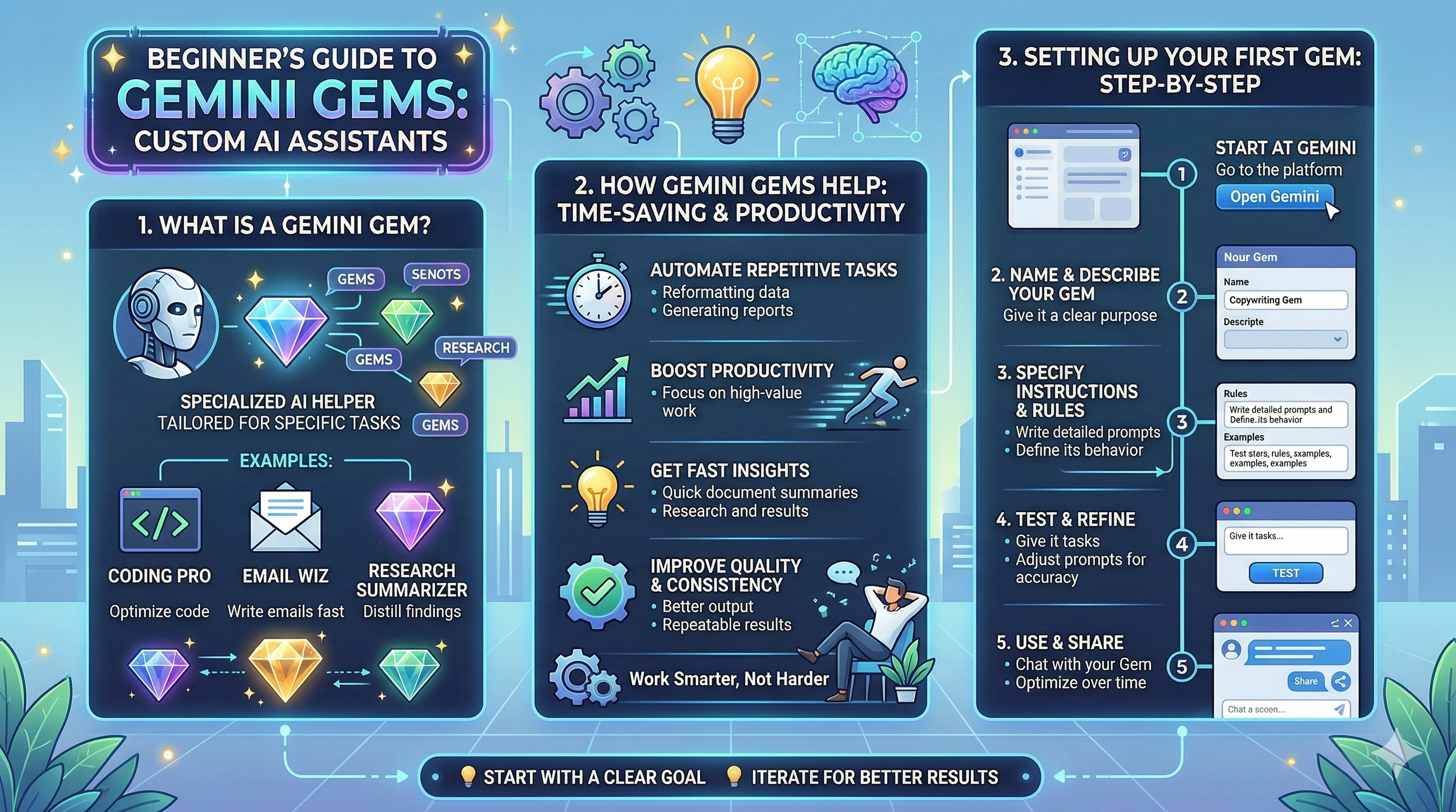
A sample Infographic from Nano Banana 2.0 on setting up Gemini Gems.
The Emerging AI Browsers: Atlas and Comet
Finally, the way we interact with the web is changing. Atlas and Comet are "AI-first" browsers. Unlike Chrome, which just shows you a webpage, these browsers interpret the content and can take actions on your behalf.
Comet is built for research-heavy leaders. It handles tab management and can conduct end-to-end research while you focus on analysis. Atlas is built with deep integration, allowing you to highlight text on any webpage and ask it to rewrite, summarize, or even fill out a web form for you without ever switching apps. They are designed to compress multi-step tasks into rapid sequences, which can be useful in a busy, always on the go word.
Practical Applications for the Retail Leader
Knowing these tools exist is one thing, but using them to actually improve your leadership is another. Here are a few ways to put them to work right now for your personal development:
Coaching Simulations: Use a Gemini Gem to practice high-stakes conversations. Set the persona of a frustrated associate and walk through your "Ask, don't tell" approach. It helps you find the right words and build confidence before you ever step onto the floor.
Industry Deep Dives: Use Perplexity Computer to stay ahead of retail trends. Ask it to find the three biggest shifts in customer loyalty programs for 2026. It gives you the "why" and the "how" so you can speak with your team if they are asking for reasons behind such a strong push on email capture or loyalty signups.
Training Infographics: Use Nano Banana 2.0 to create visual guides for your team. Instead of a wall of text on the backroom door, create a clean infographic that shows the three steps of an effective checkout process. It makes the "what" and the "why" of the work much clearer for your team.
Meeting Synthesis: After a regional call, use your favorite LLM (ChatGPT, Gemini, or Claude) to pull the "actionable takeaways" from the transcript. It helps you move from just "hearing" the information to having an intentional plan for your store.
The Human Element
As impressive as these tools are, they are still just tools. Leadership still starts in the mirror. No AI can replace the authentic connection you build with your team or the empathy you show when an associate is having a rough day.
The real value of these resources is that they take the "busy work" off your plate. They handle the formatting, the initial research, and the repetitive prompting so that you can spend more time where it matters: with your people. When you use AI to handle the data, you free up your mental energy to lead with human precision. Take a look at one of these tools this week. Don't try to master them all at once. Pick one, maybe a Coaching Gem or a research deep dive, and see how it can help you get more of the right things done. Experimenting with these new tools is half the fun right now. It will get your learning juices flowing.
What new AI tools have you tried recently? How has it helped you approach things in new ways?
Get leadership tips and new articles you can use directly to your inbox. Join the thousands of other leaders continuing your leadership development journey with **Effective Retail Leader.com.**
DISCLAIMER: I participate in the Amazon Services LLC Associates Program, an affiliate advertising program designed to provide a means for me to earn fees by linking to Amazon.com and affiliated sites. Other links to third-party products and services may also be affiliate links.